
Kaizen Health logo
Try Kai free
Version 1.15.0Published July 16, 2026

Your Family's Health, Right on Your Home Screen

Three new iPhone widget sizes bring your Health Score, Kai insights, Care Circle, medications, events, and favorite Kaizen shortcuts into view without opening the app.

AI insightsCare CircleHealth ScoreiOSPerformanceWidgets
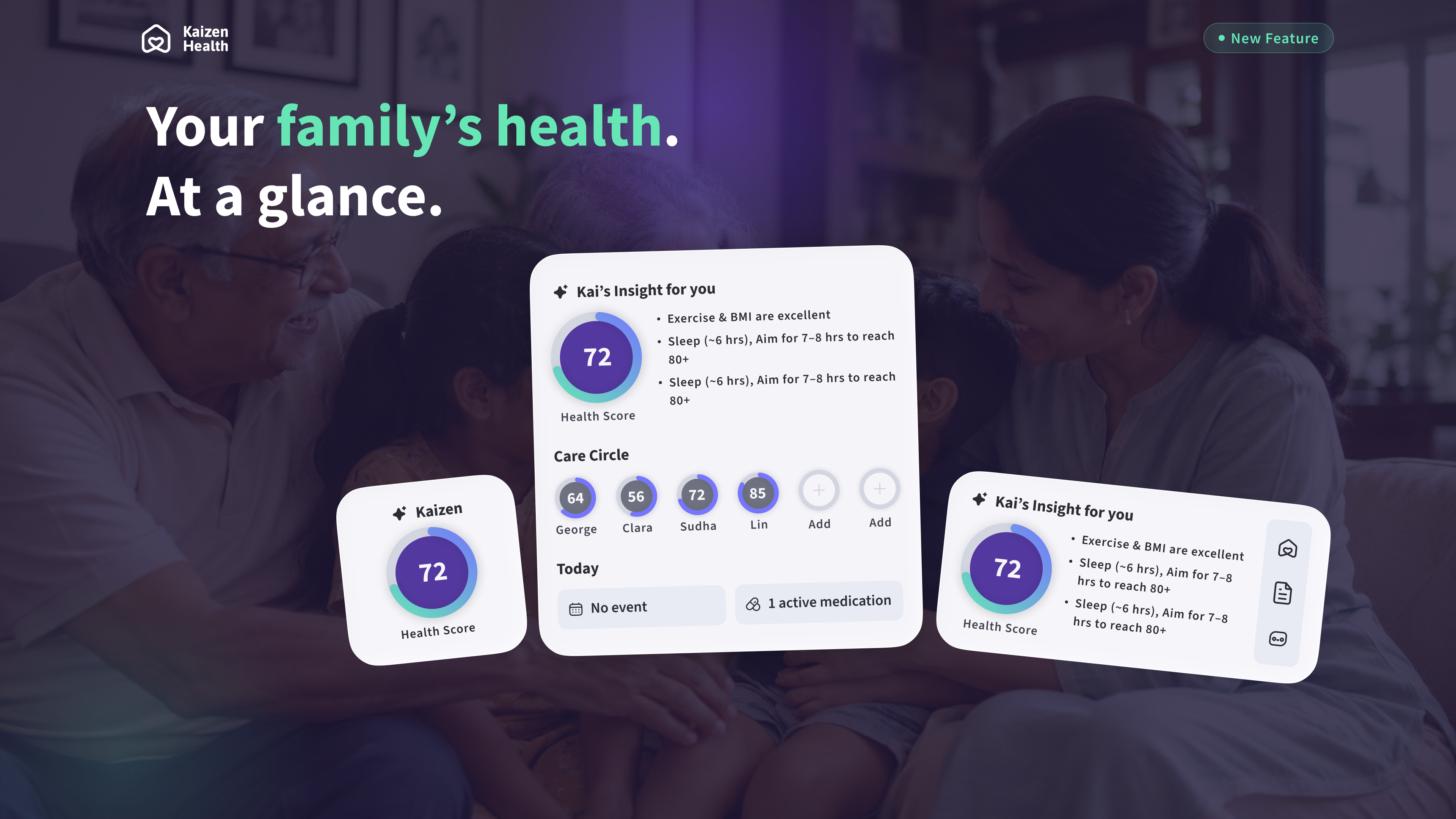
Kaizen Health's small, medium, and large iPhone Home Screen widgets displayed over a family photo.

What's in this release

The key moments, improvements, and fixes you can expect after updating.

Three Home Screen layoutsNew
Choose a small, medium, or large Kaizen Health widget based on how much information you want at a glance.
Your latest Health ScoreNew
Keep your most recent Health Score visible on your iPhone Home Screen and tap through when you want more detail.
Kai insights at a glanceNew
See a concise view of personalized health signals, including the areas that may deserve your attention.
Care Circle visibilityNew
The large widget shows up to six favorite family members and their latest available Health Scores.
Faster paths into KaizenNew
Tap widget content and shortcuts to open Home, Documents, Kai chat, Health Profiles, and relevant event details.
Latest GPT modelsImproved
Kai's GPT-powered experience now runs on the latest model lineup, alongside reliability and bug fixes behind the scenes.

Home Screen Widgets are here

Kaizen Health v1.15.0 makes it easier to stay connected to your own health and your family's care throughout the day. Add Kaizen to your iPhone Home Screen to see the information that matters most without first finding and opening the app.

  • Check your latest available Health Score in a glanceable format.
  • See personalized signals and insights from Kai.
  • Keep an eye on favorite members of your Care Circle.
  • Review your next upcoming event and active medication count.
  • Jump directly to the Kaizen features you use most.

Choose the view that fits your day

The Kaizen Health widget is available in three sizes. Each layout is designed for a different balance of space, detail, and quick access, and you can add more than one to your Home Screen.

  • Small — keeps your latest Health Score front and center. Tap the widget to open Kai chat.
  • Medium — combines your Health Score with Kai's insight and quick shortcuts to Home, Documents, and AI chat.
  • Large — brings together your Health Score, Kai's insight, up to six favorite Care Circle members, your next upcoming event, and your active medication count.

How to add a Kaizen Health widget

After updating Kaizen Health to v1.15.0, open the app and sign in at least once so your latest information can be prepared for the widget. Then add it using the standard iPhone Home Screen controls.

Animated demonstration of adding a Kaizen Health widget to an iPhone Home Screen.
Follow along to add Kaizen Health from the iPhone widget gallery.
  • 1. Touch and hold an empty area of your Home Screen until the apps begin to jiggle.
  • 2. Tap the Add (+) button, or choose "Edit" and then "Add Widget," depending on your iOS version.
  • 3. Search for and select Kaizen Health in the widget gallery.
  • 4. Swipe to preview the small, medium, and large layouts.
  • 5. Tap "Add Widget," place it where you want it, and tap "Done."

Designed to take you to the right place

The widgets are more than a read-only snapshot. Tappable areas open the corresponding part of Kaizen Health so you can move from a quick glance to the full context with less navigation.

  • Open your Health Profile from your score or Kai insight.
  • Open a favorite Care Circle member's Health Profile by tapping their score.
  • Open an upcoming event directly when event details are available.
  • Use the medium widget shortcuts to open Home, Documents, or Kai chat.
  • Tap an empty Care Circle position to return to Home and manage the people you follow most closely.

Keeping widget information current

Your widget displays a recent snapshot from Kaizen Health. The app asks iOS to refresh that snapshot when updated health information is available, when you return to the app, and during supported background activity. Because iOS ultimately schedules widget updates, a change may not appear instantly.

  • Open Kaizen Health if a widget has not populated after you first add it.
  • Make sure you are signed in and connected to the internet when you want to retrieve newer information.
  • Your Care Circle display follows your favorite members in Kaizen Health and shows up to the first six.
  • Upcoming events automatically roll forward as their scheduled times pass.
  • If one source cannot refresh, the widget keeps the last available snapshot instead of clearing otherwise useful information.

A note about privacy

Home Screen widgets are intentionally glanceable, which means their content can be seen by anyone who can view your unlocked Home Screen. Choose the widget size and placement that feel right for you, especially if you share your device or regularly show your Home Screen to others.

  • Only add a health widget when you are comfortable displaying its information on your Home Screen.
  • Signing out of Kaizen Health clears the health snapshot shared with the widget.
  • The same Kaizen account permissions and Care Circle access rules continue to determine what information is available.

Smarter AI infrastructure

This release also updates the GPT models behind Kai to the latest available versions. The upgrade is delivered on the backend, so there is nothing extra to configure after updating or signing in.

  • Updated GPT model support for Kai's AI-powered experiences.
  • Reliability fixes for AI responses and supporting services.
  • Additional bug fixes across the backend.

Additional improvements

Alongside widgets and the AI updates, v1.15.0 includes a broader round of polish to make Kaizen Health faster, steadier, and more dependable in everyday use.

  • Performance enhancements across affected app experiences.
  • Stability improvements that reduce interruptions and unexpected behavior.
  • Minor bug fixes and interface polish.

Availability

Home Screen widgets are available on iPhone with Kaizen Health v1.15.0. Update the app from the App Store, open it once, and follow the steps above to add your preferred layout. Users on other supported platforms still receive the performance, stability, AI, and bug-fix improvements included in this release.

Stay Connected

Tell us which widget size you use most and what health information you would like to see at a glance next.

Continue exploring

Browse other Kaizen Health releases

Get Kaizen Health free

Download the App